Areas and Lengths in Polar Coordinates
Areas and Lengths in Polar CoordinatesExpected Educational ResultsBloom’s TaxonomyAreas and Lengths in Polar CoordinatesAreaDefinition: Area Bounded by a Polar CurveGeneral Idea Behind Area FormulaSketching Area Bounded by Polar CurvesInvestigation 01Use Technology to Rewrite a Polar EquationUse Technology to Verify Area Enclosed by a Polar CurveUse Technology to Solve Polar Equations ExactlyInvestigation 02Use Technology to Exaclty Solve for Intesection of Polar EquationsHomeworkCC BY-NC-SA 4.0
Author: John J Weber III, PhD Corresponding Textbook Sections:
Section 10.4 – Areas and Lengths in Polar Coordinates
Expected Educational Results
Objective 17–01: I can set up the integral to compute the area bounded by one or two polar curves.
Objective 17–02: I can evaluate the integral to compute the area bounded by one or two polar curves.
Objective 17–03: I can set up the integral to compute the arclength of a polar curve.
Objective 17–04: I can estimate the integral for the arclength of a polar curve.
Bloom’s Taxonomy
A modern version of Bloom’s Taxonomy is included here to recognize various different levels of understanding and to encourage you to work towards higher-order understanding (those at the top of the pyramid). All Objectives, Investigations, Activities, etc. are color-coded with the level of understanding.

Areas and Lengths in Polar Coordinates
Area
Definition: Area Bounded by a Polar Curve
General Idea Behind Area Formula
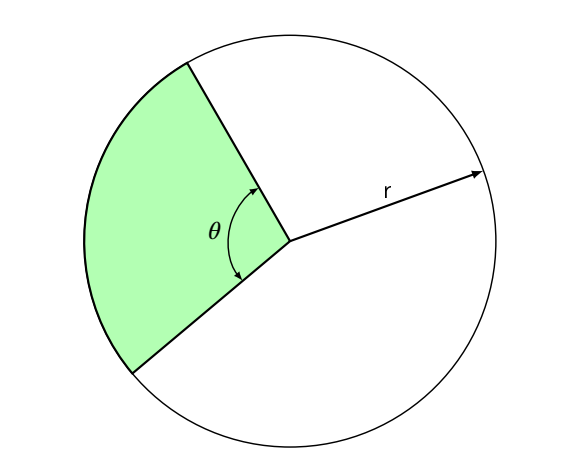
In the Figure above, the area of the large circle is
When we compute areas, we take increasingly smaller regions and sum up as an integral. The green section only depends on
So, the area of the polar curves is
NOTE: Due to the
Sketching Area Bounded by Polar Curves
Investigation 01
Find the following areas:
The area enclosed by
The area enclosed by
The area enclosed by one petal of
Use Technology to Rewrite a Polar Equation
NOTE: Since the area formula for polar curves contains
Mathematica
x1(* Example from Investigation 01-2 *)2(* Use the variable t instead of theta *)3
4(* Rewrite integrand using a trig identity *)5TrigReduce[(2 + 3 Cos[t])^2]Warnings:
Be very careful with the syntax. Syntax is the set of rules on how to write computer code. Every software program has its own unique syntax. Some basic Mathematica syntax is located at: http://www.jjw3.com/TECH_Common_Functions.pdf.
TrigReduce[ ] has one argument:
The function to be rewritten.
For help on using the TrigReduce[ ] function:
In Mathematica, execute the code:
Click on
Click on local
Read how to use the TrigReduce[ ] function – you will be able to copy-paste code.
Remember, correct Mathematica code will be all black except for variables.
To execute code (including comment codes), press and hold the SHIFT key and press the ENTER key.
Use Technology to Verify Area Enclosed by a Polar Curve
NOTE: On all Assessments, you may use technology to verify your computed area. You must show all Calculus II related work.
Mathematica
xxxxxxxxxx51(* Example from Investigation 01-2 *)2(* Use the variable t instead of theta *)3
4(* Find the area enclosed by the curve *)51/2*Integrate[(2+3Cos[t])^2, {t,Pi/4,Pi/3}]Warnings:
Be very careful with the syntax. Syntax is the set of rules on how to write computer code. Every software program has its own unique syntax. Some basic Mathematica syntax is located at: http://www.jjw3.com/TECH_Common_Functions.pdf.
Integrate[ ] has at least two arguments:
The function in the integrand;
For help on using the Integrate[ ] function:
In Mathematica, execute the code:
Click on
Click on local
Read how to use the Integrate[ ] function – you will be able to copy-paste code.
Remember, correct Mathematica code will be all black except for variables.
To execute code (including comment codes), press and hold the SHIFT key and press the ENTER key.
Use Technology to Solve Polar Equations Exactly
NOTE: On all Assessments, you may use technology to solve equations without showing any work.
Mathematica
xxxxxxxxxx111(* Example from Investigation 01-3 *)2(* from the DESMOS graph, a petal starts and ends at the 2origin, r=0 *)3(* Use the variable t instead of theta *)4
5(* Restrict answers to [0,2pi) *)6Solve[Sin[t]==Cos[2t] && 0 <= t < 2 Pi, t, Reals]7
8(* If the answers from the above code are not easy to interpret *)9
10(* Solve using the simplified trig equation *)11Solve[Cos[t]==Cos[2t] && 0 <= t < 2 Pi, t, Reals]//NWarnings:
Be very careful with the syntax. Syntax is the set of rules on how to write computer code. Every software program has its own unique syntax. Some basic Mathematica syntax is located at: http://www.jjw3.com/TECH_Common_Functions.pdf.
Mathematica requires two
Solve[ ] has at least two arguments:
The equation to be solved;
The variable, i.e.,
The argument
Mathematica may return complex solutions; thus, either
Identify a complex solution (the result includes the imaginary unit,
Use the argument Reals.
For help on using the Solve[ ] function:
In Mathematica, execute the code:
Click on
Click on local
Read how to use the Solve[ ] function – you will be able to copy-paste code.
Remember, correct Mathematica code will be all black except for variables.
To execute code (including comment codes), press and hold the SHIFT key and press the ENTER key.
Investigation 02
Find the following areas:
The area that lies inside
The area that lies inside both
HINT: Graph the curves in DESMOS or use Mathematica to find the exact intersections of the polar functions.
Use Technology to Exaclty Solve for Intesection of Polar Equations
NOTE: On all Assessments, you may use technology to solve equations without showing any work.
Mathematica
xxxxxxxxxx111(* Investigation 02-2 *)2(* To solve for intesection(s) of r=sin(2t) and r=cos(2t) *)3(* Use the variable t instead of theta *)4
5(* Restrict answers to [0,2pi) *)6Solve[Sin[2t]==0 && 0 <= t < 2 Pi, t, Reals]7
8(* If the answers from the above code are not easy to interpret *)9
10(* Solve using the simplified trig equation *)11Solve[Sin[2t]==0 && 0 <= t < 2 Pi, t, Reals]//NWarnings:
Be very careful with the syntax. Syntax is the set of rules on how to write computer code. Every software program has its own unique syntax. Some basic Mathematica syntax is located at: http://www.jjw3.com/TECH_Common_Functions.pdf.
Mathematica requires two
Solve[ ] has at least two arguments:
The equation to be solved;
The variable, i.e.,
The argument
Mathematica may return complex solutions; thus, either
Identify a complex solution (the result includes the imaginary unit,
Use the argument Reals.
For help on using the Solve[ ] function:
In Mathematica, execute the code:
Click on
Click on local
Read how to use the Solve[ ] function – you will be able to copy-paste code.
Remember, correct Mathematica code will be all black except for variables.
To execute code (including comment codes), press and hold the SHIFT key and press the ENTER key.
Homework
At this time, you should be able to complete the following assignments:
Section 10.4: # 1, 2, 3, 5--9, 11, 17, 19, 21, 23, 25, 27, 29, 31, 33, 35, 37, 39, 41.
CC BY-NC-SA 4.0
This work is licensed under a Creative Commons Attribution-NonCommercial-ShareAlike 4.0 International License [http://creativecommons.org/licenses/by-nc-sa/4.0/].
Created: Tuesday, 3 November 2020 7:04 EDT Last Modified: Sunday, 31 October 2021 - 09:20 (EDT)