Volumes
VolumesBloom’s TaxonomyExpected Educational ResultsVolumesMethodsDefinition: Volume by Disk MethodDefinition: Volume by Washer MethodDefinition: Volume by Cylindrical ShellsProcedureInvestigation 05Investigation 06Check Your WorkUse Technology to Verify Volume ComputationCC BY-NC-SA 4.0
Author: John J Weber III, PhD Corresponding Textbook Sections:
- Objective 11–1: I can set up the integral to compute the volume obtained by rotating a region about an axis.
- Objective 11–2: I can evaluate the integral to compute the volume obtained by rotating a region about an axis using FTC-II.
Bloom’s Taxonomy
A modern version of Bloom’s Taxonomy is included here to recognize various different levels of understanding and to encourage you to work towards higher-order understanding (those at the top of the pyramid). All Objectives, Investigations, Activities, etc. are color-coded with the level of understanding.

Expected Educational Results
- Objective 11–1: I can set up the integral to compute the volume obtained by rotating a region about an axis.
- Objective 11–2: I can evaluate the integral to compute the volume obtained by rotating a region about an axis using FTC-II.
Volumes
Methods
Definition: Volume by Disk Method
The area
Definition: Volume by Washer Method
The area
Definition: Volume by Cylindrical Shells
The area
Procedure
Sketch both curves.
Identify the region enclosed by both curves.
Sketch a typical rectangle within the region where every potential rectangle starts and ends at different curves:

Identify the axis of rotation in the graph (use dotted line to quickly identify this axis in your drawing).
Find intersection(s) of curves, by
- Setting
- Setting
- Setting
Identify the method (dashed lines in the following pics are axes of rotation). Explain.
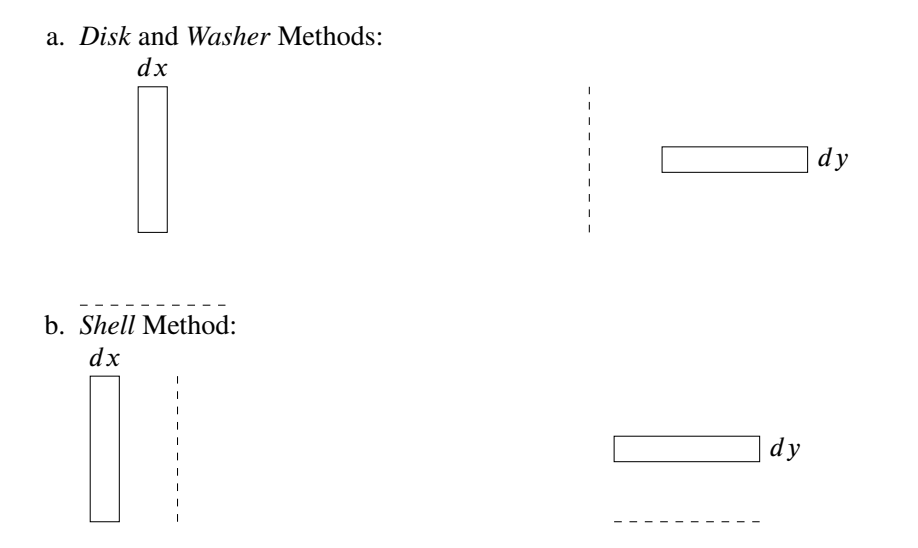
Set up the integral.
Evaluate the integral.
Investigation 05
Use the blank embedded DESMOS graph below to graph the curves. You need the graphs and the Figure in Step 6 of the Procedure to determine which method of finding volume is required.
- Find the volume of the solid obtained by rotating about the
- Find the volume of the solid obtained by rotating about the
- Find the volume of the solid obtained by rotating about the
- Find the volume of the solid obtained by rotating about the
Investigation 06
- Find the volume of the solid obtained by rotating about the
Check Your Work
Use Technology to Verify Volume Computation
NOTE: The use of technology in this activity is to verify, i.e., check, your answers. You must show work on assessments to receive credit for all Calculus II work.
Mathematica
To check the answer in Investigation 05-1:
x
1(* Investigation 05-1 *)2Pi*Integrate[Cos[x]^2-Sin[x]^2, {x,0,Pi/4}]Warnings:
Be very careful with the syntax. Syntax is the set of rules on how to write computer code. Every software program has its own unique syntax. Some basic Mathematica syntax is located at: https://www.jjw3.com/Common_Mathematica_Code.html.
Integrate[ ] has two arguments:
The function in the integrand of the average value integral;
For help on using the Integrate[ ] function:
- In Mathematica, execute the code:
- Click on
- Click on local
- Read how to use the Integrate[ ] function – you will be able to copy-paste code.
- In Mathematica, execute the code:
You may need parens,
Remember, correct Mathematica code will be all black except for variables.
To execute code (including comment codes), press and hold the SHIFT key and press the ENTER key.
CC BY-NC-SA 4.0
This work is licensed under a Creative Commons Attribution-NonCommercial-ShareAlike 4.0 International License [http://creativecommons.org/licenses/by-nc-sa/4.0/].
Created: Tuesday, 29 September 2020 11:49 EDT Last Modified: Wednesday, 02 March 2022 - 04:30 (EST)